How to Change Grammarly Languages?

Grammarly is one of the finest writing assistants that is changing the writing standards of millions around the globe. You may want to change or tweak the settings in the Grammarly app in many instances. One such setting is the change of languages.
This blog will highlight the need to change Grammarly languages and how you can do so.
It will focus on two parts, one where you need to switch the Primary language like Spanish from English and the second is to switch the dialect for example American English to British English.
How can I change languages and dialects in Grammarly?
To change languages or dialects in Grammarly, log into your account, navigate to settings, select “Customize,” then choose “Language” and adjust the primary language or dialect accordingly. Follow these steps to enhance your writing experience.
Changing the Dialect of your Primary Language
If you are one of those who write in multiple versions of English, adjusting these settings can optimize Grammarly for checking text in the desired language. For example, if you want to switch from American English to UK English to Australian English get more custom corrections from Grammarly.
I have seen many writers and editors who work for multiple clients across the globe find it difficult to switch from one version of English to another version. In this guide, we will take you through a step-by-step guide on how to change the Grammarly languages in the settings.
Step 1
The first step is to log in to your Grammarly account and access the dashboard. Go to grammarly.com and click on “Log in” in the top right corner. Enter your email and password to access your Grammarly account.
Step-2
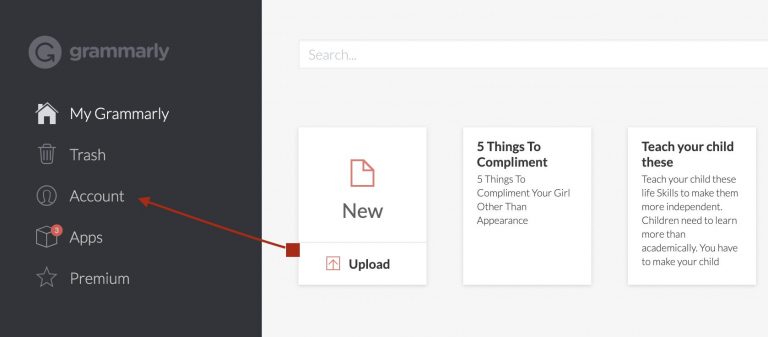
The next step is to Click on the account option on the left-hand pane on the dashboard.
Step-3
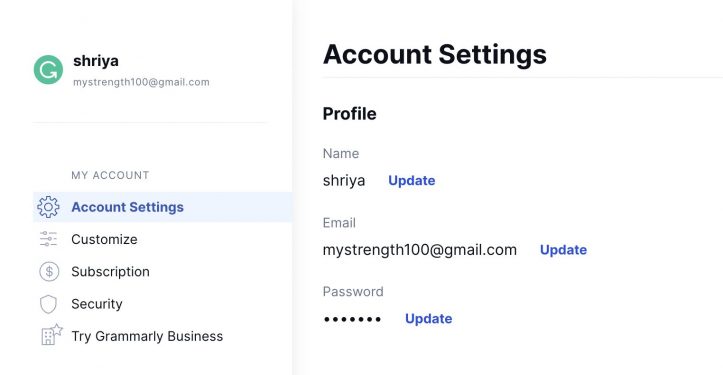
After clicking on the account, you will land on the account settings age. All of your Grammarly settings will be listed here. You will see the Customize option just under the account settings on the left side menu. Click on it and proceed to the next step.
Step-4
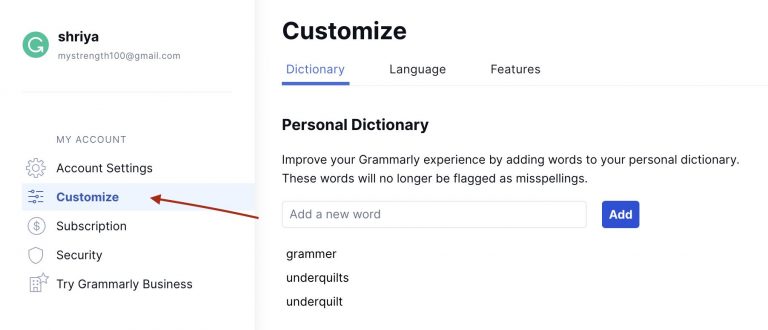
After you click on the customize, it will take you to the customize page where you will see your dictionary, language, and features settings. Click on Language on the top menu beside the dictionary.
Step-5
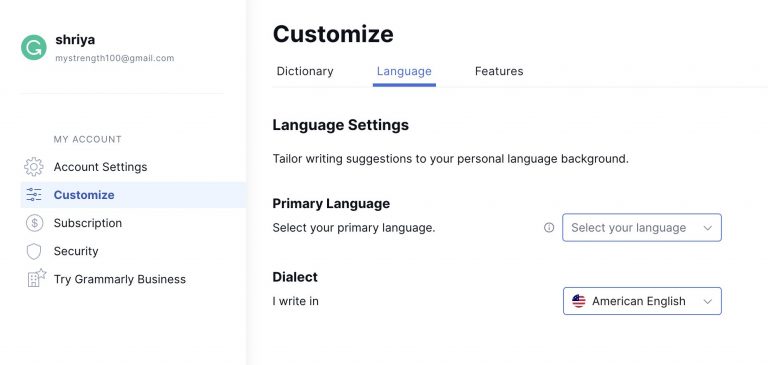
In the language settings, you can choose to change your primary language or dialect (the variation of your primary language). In this case, we will change the dialect of our primary language, English.
We can select from the following options
- American English
- British English
- Canadian English
- Indian English
- Australian English
Changing the Primary Language in Grammarly
By default, Grammarly uses English as the primary language. If you want to use another language other than English then here are the steps you need to follow.
Here are the steps to change the primary language in Grammarly:
Step-1
Log into your Grammarly account online. Go to grammarly.com and click on “Log in” in the top right corner. Enter your email and password to access your Grammarly account.
Step-2
2. Click on “Account” in the top right corner after logging in. This will open up your account settings.
Step-3
3. Under “Account Settings,” click on “Customize.” This will open your grammar and writing settings.
Step-4
4. Under “Languages,” click on “Primary Language.” A drop-down menu will appear with a list of languages. Here you can select the primary language of your choice. It supports more than 150 different languages such as Danish, African, Spanish, Dutch, Bavarian, Finnish, Filipino, French, Greek, Hebrew, Hungarian, Indonesian, Italian, Japanese, Chinese, Nepali, Korean, Polish, Portuguese, and many others, It also supports many Indian languages like Hindi, Marathi, Assamese, Malayalam, Bhojpuri, Gujarati, Kashmiri and many more.
Step-5
5. Select the language you want to add from the drop-down menu. For example, if you want to add Spanish, select “Español.”
Step-6
6. After you have selected your preferred primary language. You can now edit texts in your desired language like Spanish or Dutch. Grammarly will automatically suggest edits based on your primary language.
Step-7
7. To make another language your primary writing language, follow the same process to select another language name and select “Make Primary.”
Step-8
8. The selected language is now your primary language in Grammarly. Repeat steps 4-7 to choose and set any other languages you need.
Tips for Using Multiple Languages in Grammarly
When using Grammarly it’s important to keep in mind that Grammarly will check your writing based on whichever language is set as your primary. So make sure to set the correct language as the primary in your account settings.
Also, keep in mind that Grammarly AI suggestions are based on the Primary Language and the Dialect selected. For example, if you have chosen English as your primary language then make sure to check which dialect you want such as American, British Australian, Indian or Canadian. The dialect also has a lot of effect on the writing suggestions.
Key Takeaway:
- Easily switch between primary languages and dialects in Grammarly for tailored writing assistance.
- Follow step-by-step instructions to adjust language settings and maximize Grammarly’s effectiveness.
- Ensure correct language and dialect selections for accurate proofreading and suggestions.
Conclusion
If you are someone who works with different types of English then changing the language settings can help you give better results. It just takes a few simple steps to log into your account, access the language settings, and change the primary language or the dialect of your primary language.
Making a language primary will set it as the default for grammar and spell-checking. Don’t forget to double-check that you have the correct language showing before you begin writing in a different language.
Grammarly provides a better experience no matter what language you are writing in. Utilizing multiple languages allows you to leverage Grammarly’s powerful proofreading features in all of your multilingual writing.