Best Plagiarism Checkers 2025
The best plagiarism checker should accurately find plagiarism, even if the wording changes. It should also give a clear and detailed report.
Some of the best plagiarism detectors have been shortlisted across multiple factors.
List of Best Plagiarism Checkers
1. Unicheck
An easy-to-use and powerful plagiarism checker perfect for large organizations.
Unicheck offers high-quality service by combining advanced technology with smart design, and it’s proven by its use in over 1,000 academic institutions worldwide.
This tool has access to more than 91 billion pages and library files, ensuring comprehensive plagiarism checks.
The results are presented in a clear interface with sources, color-coded copied text, and an adjustable plagiarism score as you edit.
With 99.9% system uptime, you can check for plagiarism anytime, and its secure, encrypted accounts provide high-level security.
Unicheck’s versatility is evident in its dashboard for managing multiple sources and articles, and its integration with Office 365, Google Docs, and Chrome.
Unicheck is also cost-effective. No matter the package, Unicheck is one of the best plagiarism checkers available.
2. Scribbr
It detects plagiarism more accurately than any other checker.
Scribbr offers a plagiarism checker along with academic proofreading and an APA reference generator.
Ideal for students and academics, helping with dissertations, essays, and theses.
Scribbr partners with Turnitin to detect precise plagiarism, including synonym changes.
Scribbr offers a limited free version and it detects plagiarism even in edited texts, proving its effectiveness against paraphrasing plagiarism.
Without a dashboard and security features, Scribbr isn’t ideal for large enterprises. However, it’s well-designed and invaluable for students and academics.
3. Grammarly
This famous plagiarism checker offers top-notch language accuracy.
Grammarly is a super popular writing helper that’s loved worldwide. It’s great for checking your writing for correctness, readability, and tone.
You can use it as an app, a plug-in for word processors, or a browser extension. It works in emails, social media, and even in Slack and Discord.
Grammarly also has a top-notch plagiarism checker. It scans through academic papers and billions of web pages to find copied text. If it spots any, you’ll get a heads-up right in your document.
While the basic plagiarism checker is free, it’s better to go for the paid versions. They include not just plagiarism detection but also grammar, spelling, punctuation checks, clarity, engagement, and tone suggestions.
Grammarly is simply one of the best writing tools out there.
4. Quetext
Quetext catches more plagiarism (about 49% on average) than any other free tool. However, it doesn’t always match each sentence to a single source. Instead, different sentences might be linked to different sources.
It has a Built-in citation assistant that helps to add missing citations.
Although Quetext says it checks academic sources, it’s not very good at spotting plagiarism from sources like journal articles or student dissertations.
Quetext’s plagiarism report is easy to grasp and gives a helpful summary. It shows a precise percentage of similarity and highlights similarities in the text.
However, the report could be easier to read because it doesn’t use different colors for different sources. It uses orange for partial matches and red for full matches.
It has a citation assistant, but it’s not very strong. The citations it generates might not be accurate, and you often have to add a lot of information by hand.
5. Viper
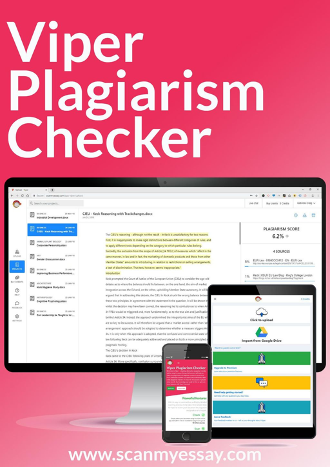
Viper enables users to check their text against their previously uploaded documents, which helps in detecting instances of self-plagiarism. It matches the texts with the previously stored submissions.
It uses different colors for various source types, making it easy to identify and differentiate sources within the text.
The paid version of the tool keeps your document private. However, the free version uploads your document to an internal database and publishes it on an external website after three months, which is not ideal for confidential content.
Viper detected about half of the plagiarism in texts that were directly copied or lightly edited. It has trouble finding plagiarism in texts that were moderately or heavily edited.
6. Plagaware
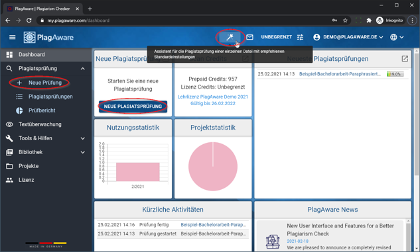
Plagaware excelled at identifying complete instances of copied content and pinpointing the original source, it struggled with heavily paraphrased text.
if someone changes the words around a bit (like rewriting a sentence), Plagaware might miss it.
Also, Plagaware can sometimes get confused if someone uses bits and pieces from different sources without properly crediting them all.
So, while Plagaware is a handy tool, it’s important to remember it might not catch everything, especially if someone is trying to be sneaky about copying.
Documents are not stored in a database. The tool shows how many words are in a plagiarized section and provides a similarity percentage.
FAQ’s
1. What are the most accurate plagiarism checkers?
Grammarly, Scribbr, Quetext, and Viper are some of the most accurate plagiarism checkers.
2. What is better Scribber or Turnitin?
Scribbr’s plagiarism checker uses the same technology as Turnitin. So, if your school or university provides access to Turnitin, Scribbr offers scans of similar quality, plus some extra paid features.